
Lighting Guides & Tips, Lighting Ideas
How to Fix Eye Strain from Bad Home Office Lighting
You take screen breaks. You’ve adjusted your monitor brightness. You even bought blue-light glasses. And by mid-afternoon, your eyes are still dry, tired, and aching behind the brow bone.
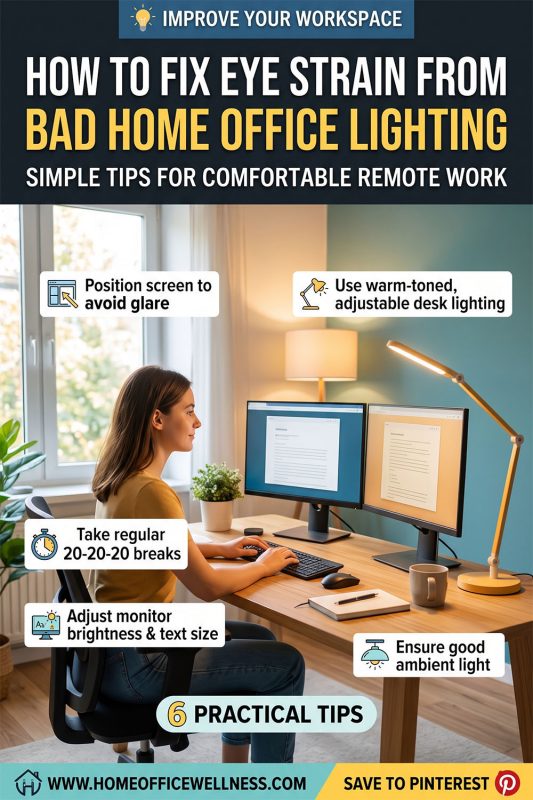
The overlooked cause in most cases isn’t your screen at all – it’s the lighting around your screen. Eye strain happens when your eyes are forced to constantly readjust between a bright monitor and a dim or mismatched room, or when glare bounces off your screen from a poorly placed light source. Fixing this isn’t about buying more gadgets; it’s about correcting a handful of specific lighting mistakes.
This guide breaks down exactly what causes light-related eye strain and how to fix each cause, room by room.
Why Bad Lighting Causes Eye Strain (Not Just Screen Time)
Your eyes have a pupil response that constantly adjusts to the brightest and darkest points in your field of view. When your monitor is much brighter than the room around it – or much dimmer – your eyes work overtime adjusting every few seconds, even if you don’t notice it happening.
The three most common lighting-related causes of eye strain are:
- High contrast between screen and room – a bright screen in a dark room, or a dim screen in a bright room
- Direct glare – light reflecting off your monitor or hitting your eyes directly from an unshaded bulb
- Flicker – cheap LED bulbs or old fluorescent tubes that flicker at a rate invisible to the conscious eye but still detected by the nervous system
This is exactly why lighting needs to be layered correctly – see the full breakdown in The Complete Guide to Home Office Lighting.
Fix #1: Match Your Room Brightness to Your Screen Brightness
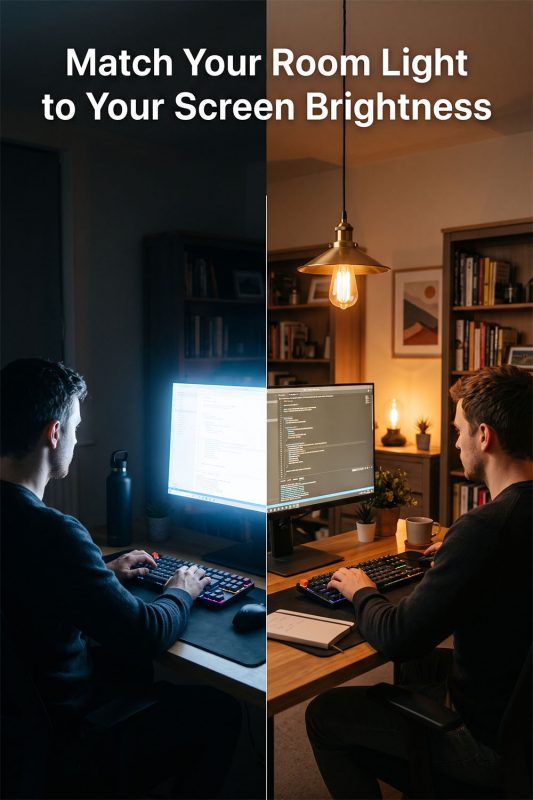
This is the single biggest fix, and the one almost everyone skips. Your screen should not be the brightest object in the room.
How to fix it:
- Add ambient room lighting so the space around your monitor is roughly 1/3 to 1/2 as bright as your screen – not pitch black, not glaringly lit
- Avoid working with only a desk lamp on at night while the rest of the room stays dark – this creates the exact high-contrast condition that strains the eyes fastest
- If you work near a window, be mindful of daylight – a very bright window behind your screen creates the same contrast problem in reverse
Not sure how much ambient light your room actually needs? How Many Lumens Do You Need for a Home Office? has the exact numbers.
Fix #2: Eliminate Direct and Reflected Glare
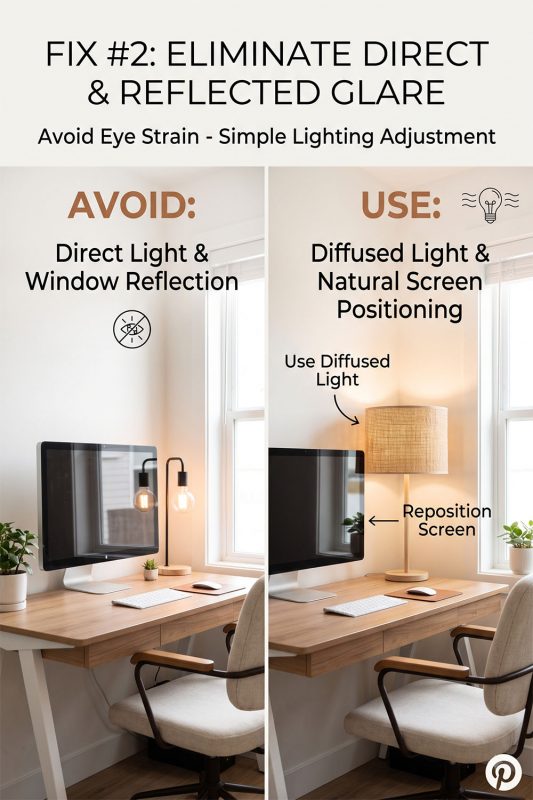
Glare is the fastest way to strain your eyes, and it’s often invisible until you know what to look for.
How to check for it:
- Turn your monitor off and look at the black screen – if you can see a reflection of a lamp, window, or overhead light, that same glare is hitting your eyes constantly while you work
- Move your desk lamp or pendant light so it sits beside or slightly behind your monitor, never directly across from or behind you facing the screen
How to fix it:
- Use fixtures with a woven or fabric shade rather than an exposed bulb – diffused light through a natural material like rattan scatters light softly instead of casting a hard, glare-producing beam
- Reposition your desk so windows are to the side of your monitor, not directly behind or in front of it
For exact positioning, see Where to Place a Pendant Light Over Your Desk (With Diagram).
Fix #3: Switch to the Right Light Temperature for the Time of Day
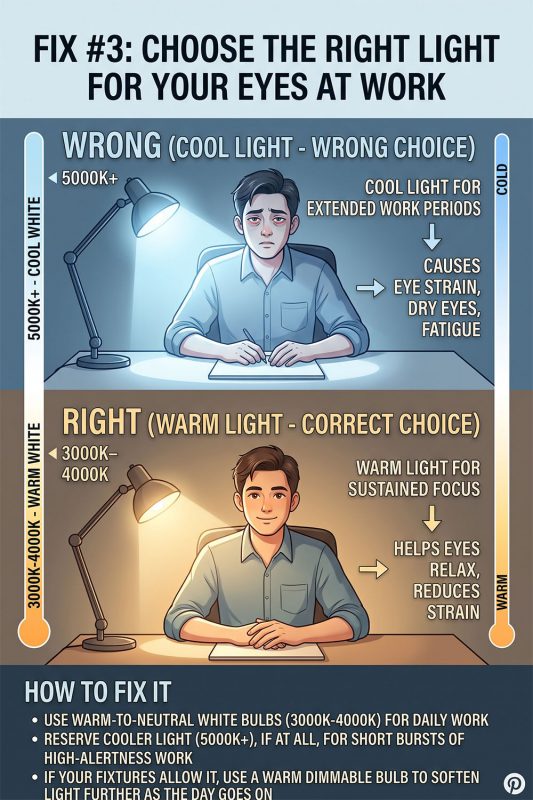
Cool, blue-toned light (5000K+) keeps your eyes and nervous system in a heightened alert state. Over a full workday, this contributes directly to fatigue and dryness. Warmer light (3000K–4000K) is easier on the eyes for sustained, hours-long focus.
How to fix it:
- Use warm-to-neutral white bulbs (3000K–4000K) for most of the workday
- Reserve cooler light (5000K+), if at all, for short bursts of high-alertness work in the early morning
- If your fixtures allow it, a warm dimmable bulb lets you soften the light further as the day goes on
See the full comparison chart in Warm vs Cool Light Temperature for Productivity: What Science Says.
Fix #4: Stop Relying on a Single Overhead Light
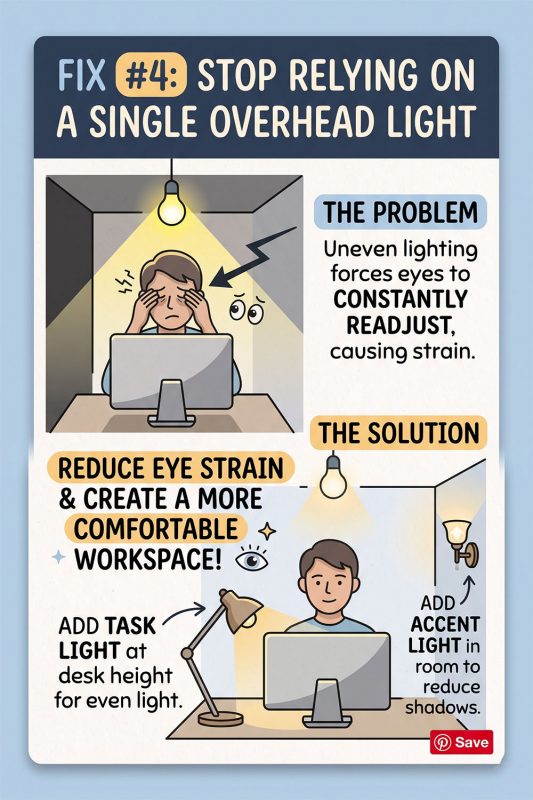
A single ceiling bulb creates uneven lighting – bright directly underneath, dim at the edges of the room – which forces your eyes to constantly readjust as you look between your screen, your desk, and the rest of the room.
How to fix it:
- Add at least one additional light source at desk height (a task lamp or low-hung pendant) so the light around your eyes is more even
- Add a small accent light elsewhere in the room (a corner floor lamp or wall sconce) to soften shadows and reduce the contrast between the lit desk area and the darker parts of the room
This uneven lighting problem is solved by layering – read Task Lighting vs Ambient Lighting: What Your Home Office Actually Needs.
Fix #5: Check for Flicker You Can’t Consciously See
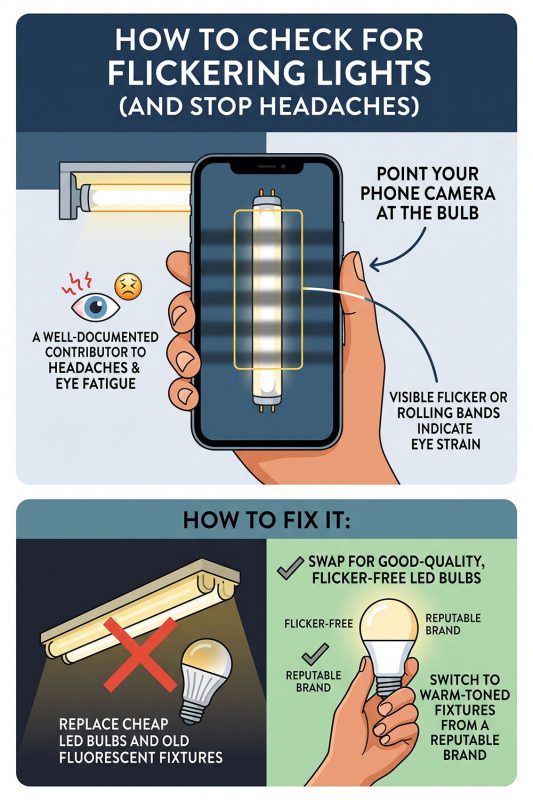
Cheap LED bulbs and old fluorescent fixtures often flicker at a rate your conscious eye doesn’t register, but your visual system still detects – this is a well-documented contributor to headaches and eye fatigue during long screen sessions.
How to check for it:
- Point your phone camera at the bulb while it’s on – visible flicker or rolling bands on your phone screen usually indicate a flicker rate your eyes are also reacting to, even if you can’t see it directly
- Swap flickering bulbs for good-quality LED bulbs rated as “flicker-free,” or switch to a warm-toned fixture from a reputable brand
Quick Eye Strain Checklist
- Room brightness is roughly 1/3–1/2 of screen brightness, not pitch dark
- No visible glare on your monitor when it’s turned off
- Light temperature between 3000K–4000K for most of the day
- At least two light sources in the room (not one single overhead bulb)
- No flicker visible through a phone camera pointed at your bulbs
- Light source positioned beside you, not directly behind your screen
Final Thoughts
Eye strain from working at home is rarely a screen problem – it’s a lighting problem hiding behind a screen problem. Fixing the contrast between your screen and room, removing glare, and layering warm, even light across your desk will do more for your eyes than any blue-light filter or extra break ever will.
Browse our Lighting collection for warm, glare-diffusing rattan and bamboo pendant lights and desk lamps designed for long work sessions.

Read more articles
Best Attic Lighting Ideas for Cozy, Functional Spaces
Transforming an attic into a functional, inviting space starts with the right lighting. Because attics [...]
Oct
Home Office Lighting Guide: Design a Space That Boosts Focus
If you’ve ever finished a workday with a headache, tired eyes, or a strange feeling [...]
Oct
Best Pantry Lighting Ideas to Brighten Your Storage Space
A well-lit pantry doesn’t just make your kitchen look more organized – it also transforms [...]
Oct
25+ Bedroom Floor Lamp Ideas to Brighten & Elevate Your Space
Bedroom floor lamp ideas offer one of the simplest and most stylish ways to elevate [...]
Oct
Best Laundry Room Lighting Ideas for a Brighter, Cleaner Space
Laundry Room Lighting Ideas focus on turning one of the hardest-working spaces in your home [...]
Sep
20+ Guest Bedroom Lighting Ideas for a Warm, Welcoming Space
Guest bedroom lighting ideas focus on creating a warm, welcoming, and comfortable environment for anyone [...]
Sep
Best Study Room Lighting Ideas for a Bright and Focused Space
A well-designed study room is more than just a desk and a chair – it’s [...]
Sep
20+ Master Bedroom Lighting Ideas for a Modern, Elegant Space
Master bedroom lighting ideas go far beyond simply choosing a ceiling fixture. A master bedroom [...]
Sep
10 Home Office Lighting Ideas for a Bright, Productive Workspace
The home office has become one of the most important rooms in modern living. Whether [...]
Aug
How to Fix Eye Strain from Bad Home Office Lighting
You take screen breaks. You’ve adjusted your monitor brightness. You even bought blue-light glasses. And [...]
Aug
25+ Bedside Pendant Light Ideas for a Stylish Modern Bedroom
Bedside Pendant Light Ideas are becoming increasingly popular as homeowners look for smarter, more stylish [...]
Aug
Best Entryway Lighting Ideas to Brighten Your Entry Space
Your entryway sets the tone for your entire home – it’s the first space guests [...]
Aug
Explore our collections
Rattan Pendant Light
104 Products
Bamboo Pendant Light
39 Products
Fabric Pendant Light
44 Products
Wood Pendant Light
13 Products
Rope Pendant Light
20 Products
Rattan Wall Sconce
6 Products
Rattan Table Lamp
9 Products
Rattan Floor Lamp
9 Products